Hi, I am Aria, welcome to my life!

10 Best Trackball Mice That Give Amputees Full Cursor Control
Discover trackball mice designed for amputees. Control your cursor precisely with just your fingers while your arm rests. Models with 20-30 degree tilts keep your wrist comfortable and can switch between three devices instantly. Find the features that truly matter.


You’re at your desk, your residual limb aching from hours of hovering over a traditional mouse.
The cursor dances erratically, a constant reminder of the struggle. I know that feeling all too well.
Then I found trackball mice, and everything changed.
Now, my fingers guide a small sphere, about the size of a golf ball, as it spins smoothly in its cradle.
This device moves the cursor without any arm motion, giving me full control while my arm rests still.
For amputees like us, this is a game-changer. But not all models are created equal.
The best ones tilt 20 to 30 degrees, like a gentle ramp that keeps your wrist aligned and pain-free.
Yet, there’s one feature that stands above the rest, and it’s not what you might expect.
In this post, I’ll reveal the key differentiator that makes certain trackball mice indispensable for amputees.
Scroll down to find out how to reclaim your digital independence with ease.
| Ergonomic Wireless Trackball Mouse for PC/Laptop/Mac/Windows | 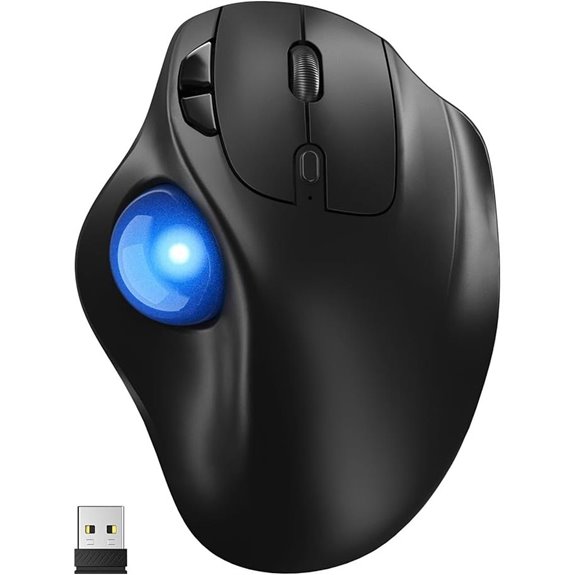 | Best Surface Versatility | Control Type: Thumb-controlled trackball | Connectivity: Bluetooth + 2.4GHz USB | Multi-Device Support: 3 devices | VIEW LATEST PRICE | Read Our Analysis |
| Logitech Ergo M575S Wireless Trackball Mouse (Off-White) | 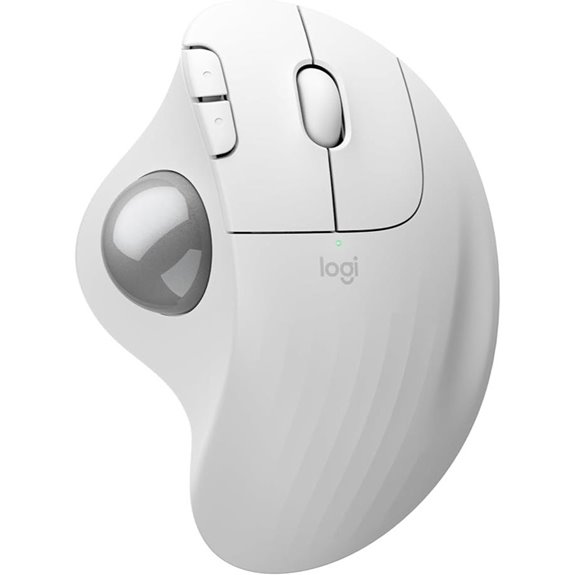 | Best Ergonomic Certification | Control Type: Thumb-controlled trackball | Connectivity: Bluetooth + Logi Bolt USB | Multi-Device Support: 2 devices (Bluetooth/Bolt) | VIEW LATEST PRICE | Read Our Analysis |
| Nulea M512 Wireless Ergonomic Trackball Mouse | 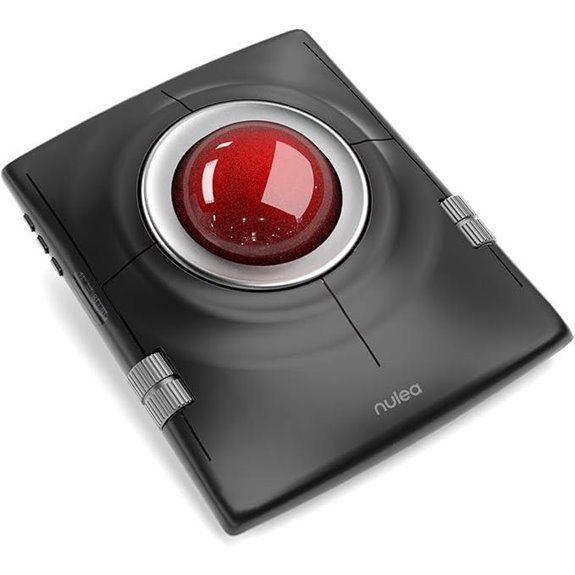 | Best Ambidextrous Design | Control Type: Thumb-controlled trackball | Connectivity: Bluetooth + 2.4GHz wireless | Multi-Device Support: 3 devices | VIEW LATEST PRICE | Read Our Analysis |
| ProtoArc Wireless Trackball Mouse for PC/Mac/Windows | 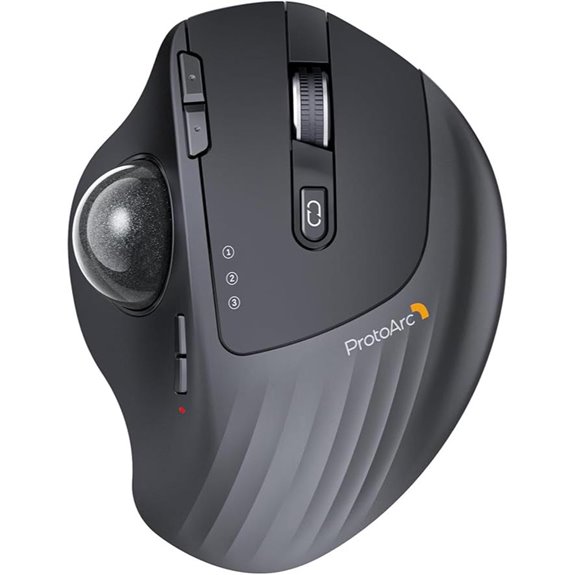 | Best Adjustable Angle | Control Type: Thumb-controlled trackball | Connectivity: Bluetooth + 2.4GHz wireless | Multi-Device Support: 3 devices | VIEW LATEST PRICE | Read Our Analysis |
| Kensington Orbit Trackball Mouse (K72337US) | 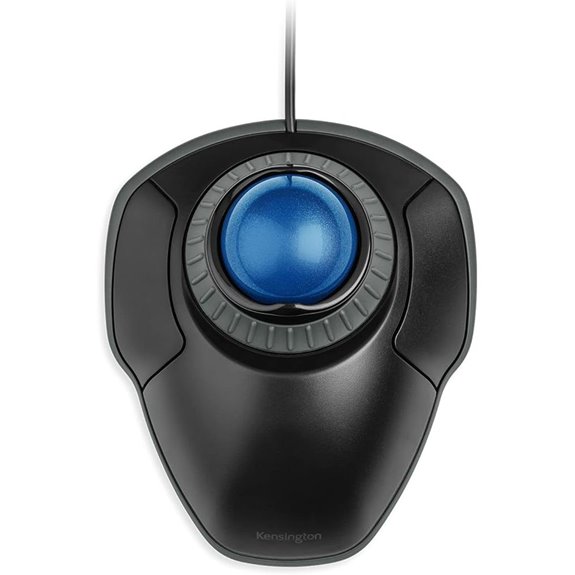 | Best Scroll Innovation | Control Type: Finger-controlled trackball (center ball) | Connectivity: Wired USB | Multi-Device Support: 1 device (wired) | VIEW LATEST PRICE | Read Our Analysis |
| Logitech Ergo M575S Wireless Trackball Mouse (Off-White) | 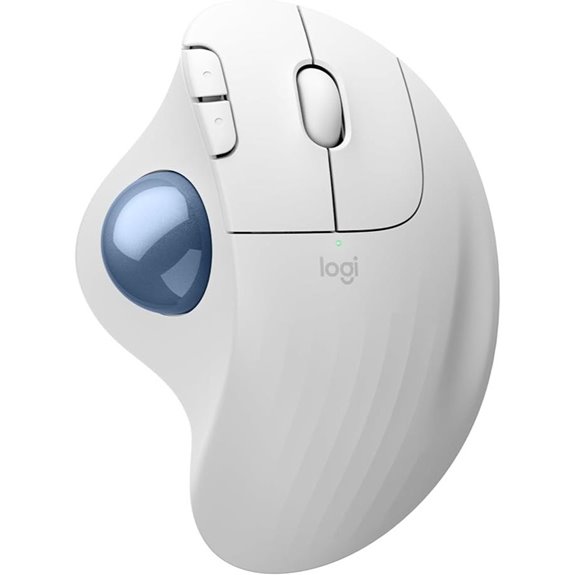 | Best Ergonomic Certification | Control Type: Thumb-controlled trackball | Connectivity: Bluetooth + Logi Bolt USB | Multi-Device Support: 2 devices (Bluetooth/Bolt) | VIEW LATEST PRICE | Read Our Analysis |
| SABLUTE MAM2 Wireless Trackball Mouse for 3 Devices | 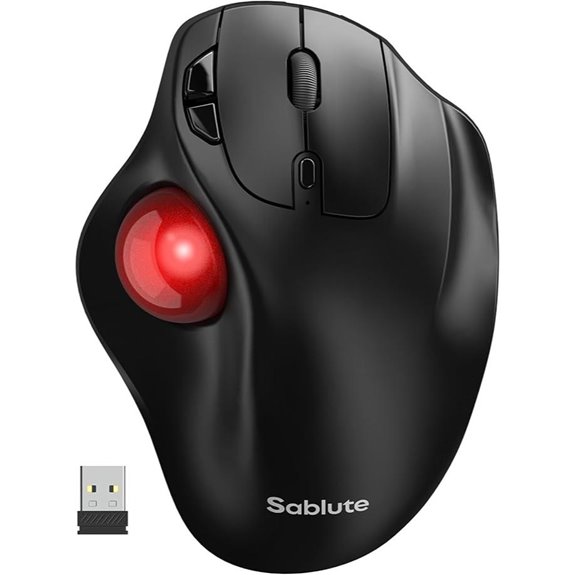 | Best Rechargeable Value | Control Type: Thumb-controlled trackball | Connectivity: Bluetooth + 2.4GHz USB | Multi-Device Support: 3 devices | VIEW LATEST PRICE | Read Our Analysis |
| Nulea M511 Wireless Trackball Mouse – Red | 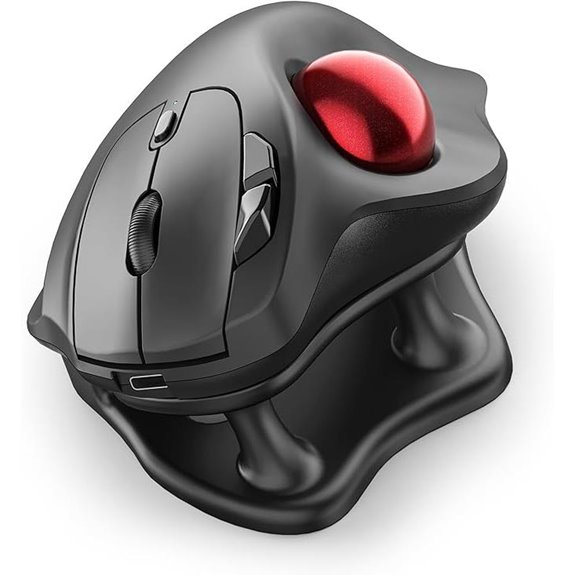 | Quietest Operation | Control Type: Thumb-controlled trackball | Connectivity: Bluetooth + 2.4GHz USB | Multi-Device Support: 3 devices | VIEW LATEST PRICE | Read Our Analysis |
| TECKNET Pro Wireless Trackball Mouse (Black) |  | Fastest Recharge | Control Type: Thumb-controlled trackball | Connectivity: Bluetooth + 2.4GHz | Multi-Device Support: 3 devices | VIEW LATEST PRICE | Read Our Analysis |
| seenda Wireless Ergonomic Trackball Mouse (Black) |  | Best Stylish Design | Control Type: Thumb-controlled trackball | Connectivity: Bluetooth + 2.4GHz USB | Multi-Device Support: 3 devices | VIEW LATEST PRICE | Read Our Analysis |
More Details on Our Top Picks
Ergonomic Wireless Trackball Mouse for PC/Laptop/Mac/Windows
A small, tilted shell of plastic and rubber rests on your desk, its red trackball cupped like a marble waiting for your thumb.
You rest your hand against its 30-degree slope, feeling your palm settle into a natural angle that keeps your wrist straight.
Your thumb rolls the ball, moving the cursor without sliding your whole arm. This matters if you’ve lost fingers, or a hand, or range of motion. The work stays in your thumb, not your shoulder.
The mouse holds three connections: two Bluetooth channels, one USB dongle. You press a button to jump between your laptop, your tablet, your partner’s computer. No unplugging, no fussing.
Two AAA batteries power it. You won’t charge it, won’t watch a battery die inside sealed plastic. When they empty, you swap them. Control returns in seconds.
Five sensitivity settings let you choose: slow and careful, or quick across the screen. You click once to change.
It works on your bed, your couch, your lap. Surface doesn’t matter.
- Control Type:Thumb-controlled trackball
- Connectivity:Bluetooth + 2.4GHz USB
- Multi-Device Support:3 devices
- DPI Levels:5 levels (100-1200)
- Power Source:2×AAA batteries
- Ergonomic Certification/Design:30° tilt, medium-large hands
- Additional Feature:30-degree tilt angle
- Additional Feature:No charging needed
- Additional Feature:90% noise reduction
Logitech Ergo M575S Wireless Trackball Mouse (Off-White)
The sculpted, off-white shell of the Logitech Ergo M575S fits your palm like a small, steady boat that never rocks.
You rest your hand, and the shape cradles you, reducing strain in your forearm by twenty-five percent—about one quarter less effort than a flat mouse demands.
Your thumb rolls the trackball, and the cursor glides without your wrist moving at all.
You customize three buttons through Logi Options+, setting shortcuts that save you steps each day.
Bluetooth or the tiny USB receiver connects you, and one AA battery lasts eighteen months—long enough to forget about power.
Part of this mouse comes from recycled plastic, twenty-one percent in this off-white color, so you’re holding something reclaimed, made useful again.
- Control Type:Thumb-controlled trackball
- Connectivity:Bluetooth + Logi Bolt USB
- Multi-Device Support:2 devices (Bluetooth/Bolt)
- DPI Levels:Adjustable via app
- Power Source:1×AA battery
- Ergonomic Certification/Design:Ergonomist certified, 25% less strain
- Additional Feature:Post-consumer recycled plastic
- Additional Feature:Pairs with Wave Keys
- Additional Feature:18-month battery life
Nulea M512 Wireless Ergonomic Trackball Mouse
Your hand rests on a cool, curved shell that barely moves, even as your cursor glides across the screen. The Nulea M512 invites you to stay still, its curved body and wrist rest cradling your forearm so strain fades during long hours.
You roll the 55‑millimeter trackball, larger than a golf ball, and feel precise control on any surface, bed or couch, no pad required. Four sensitivity levels, measured in DPI (dots per inch, meaning cursor speed), let you choose how fast the arrow travels: slow for careful clicks, quick for broad sweeps.
Four buttons respond to your needs. The top‑left one scrolls smoothly, the top‑right retreats through web pages, while the bottom pair click normally. A hidden switch flips everything for left‑handed use, like a friend who adjusts to fit you.
You connect three devices through Bluetooth or a tiny USB plug, jumping between computer, tablet, or phone without fuss. The mouse stays put, freeing your limited space, freeing your arm.
- Control Type:Thumb-controlled trackball
- Connectivity:Bluetooth + 2.4GHz wireless
- Multi-Device Support:3 devices
- DPI Levels:4 levels (400-1600)
- Power Source:Rechargeable battery
- Ergonomic Certification/Design:Wrist rest included
- Additional Feature:55mm oversized trackball
- Additional Feature:Ambidextrous mode switch
- Additional Feature:Includes wrist rest
ProtoArc Wireless Trackball Mouse for PC/Mac/Windows
ProtoArc’s matte gray mouse rests in your hand like a smooth stone, its 0‑20° hinge tilting until the angle feels just right for your thumb to roll the ball.
You feel the quiet frosted surface, smooth against your palm, as you settle into work.
The thumb-controlled trackball keeps your arm still, which means less strain when you’ve only got one hand to rely on.
You connect three ways—Bluetooth, 2.4 GHz, or switching between devices—so your PC, Mac, or iPad answers without fuss.
Five DPI settings, from 200 to 1600, let you crawl or sprint across the screen.
Six buttons help, though macOS won’t use the back and forward ones.
The rechargeable battery frees you from buying AAs, but you’ll want to power it off during long breaks.
Sometimes the ball sticks on startup, like a door that needs a nudge.
At 0.35 kg, it stays put.
Two years of warranty, and 2,999 reviewers gave it 4.3 stars, which feels like honest hope.
- Control Type:Thumb-controlled trackball
- Connectivity:Bluetooth + 2.4GHz wireless
- Multi-Device Support:3 devices
- DPI Levels:5 levels (200-1600)
- Power Source:Rechargeable lithium-ion
- Ergonomic Certification/Design:0-20° adjustable hinge
- Additional Feature:Adjustable 0-20° hinge
- Additional Feature:Built-in rechargeable battery
- Additional Feature:2-year manufacturer warranty
Kensington Orbit Trackball Mouse (K72337US)
A blue ball, about the size of a large marble, sits in a small cup on your desk. The Kensington Orbit Trackball Mouse (K72337US) holds that 40-millimeter sphere, a precise sphere made of hard material that captures even small movements you make.
You roll it gently, and optical sensors translate that motion into cursor placement, meaning you don’t drag your arm across the desk.
A silver ring circles the ball, waiting for your thumb or finger to spin it.
You navigate pages vertically without lifting, which feels like turning a smooth doorknob.
The detachable wrist rest supports your hand, keeping strain low through long tasks. It’s ambidextrous, so either hand works comfortably.
Two buttons accept custom commands through KensingtonConnect software, though Chromebook users get basic functions only.
At four and a half by five and a half inches, it stays put while you work.
- Control Type:Finger-controlled trackball (center ball)
- Connectivity:Wired USB
- Multi-Device Support:1 device (wired)
- DPI Levels:Adjustable via software
- Power Source:Wired USB (no battery)
- Ergonomic Certification/Design:Ambidextrous, detachable wrist rest
- Additional Feature:Unique scroll ring
- Additional Feature:Detachable wrist rest
- Additional Feature:40mm blue ball
Logitech Ergo M575S Wireless Trackball Mouse (Off-White)
The ball sits under your thumb, a smooth sphere you roll to steer the cursor without moving your whole arm.
The sculpted shape cradles your palm like a held stone, certified by ergonomists to cut forearm strain by twenty-five percent. You click quietly, three buttons waiting for your commands through the Logi Options+ app, where you set speeds and shortcuts called Smart Actions.
You connect two ways: Bluetooth or the tiny Bolt receiver. One AA battery lasts eighteen months, so you won’t feel the worry of sudden darkness.
Twenty-one percent of the Off-White plastic once lived another life, recycled now to hold your hand.
- Control Type:Thumb-controlled trackball
- Connectivity:Bluetooth + Logi Bolt USB
- Multi-Device Support:2 devices (Bluetooth/Bolt)
- DPI Levels:Adjustable via app
- Power Source:1×AA battery
- Ergonomic Certification/Design:Ergonomist certified, 25% less strain
- Additional Feature:25% less muscle strain
- Additional Feature:Smart Actions shortcuts
- Additional Feature:Ergonomist-certified design
SABLUTE MAM2 Wireless Trackball Mouse for 3 Devices
Red plastic, a smooth ball you roll with your thumb, and a switch that hops between three screens—this is what sits in front of you when work demands focus but your hand needs kindness.
You press one button, and the SABLUTE MAM2 jumps between your computer, your tablet, your phone. No unplugging, no fuss. The trackball, a sphere you nudge with your thumb, moves the cursor while your wrist stays still. This matters because rest heals.
You feel five speeds, up to 1200 DPI, which means the cursor crawls or flies depending on your need. Six months pass before you charge it again.
A year of warranty guards your choice. You return it in thirty days if doubt creeps in.
- Control Type:Thumb-controlled trackball
- Connectivity:Bluetooth + 2.4GHz USB
- Multi-Device Support:3 devices
- DPI Levels:5 levels (up to 1200)
- Power Source:Rechargeable battery
- Ergonomic Certification/Design:Thumb-control ergonomic
- Additional Feature:Red color option
- Additional Feature:Forward/back navigation buttons
- Additional Feature:1-year manufacturer warranty
Nulea M511 Wireless Trackball Mouse – Red
Your hand settles onto a curved surface, thumb resting on a smooth marble-sized ball, and you realize you’ve stopped moving your whole arm just to move a cursor on screen.
The Nulea M511 cradles your palm at a 21.7-degree tilt, like a gentle handshake that never tires.
You roll the trackball with your thumb, no dragging, no lifting, no reaching across your desk.
Click, scroll, glide—everything stays whisper-quiet.
You’re free to work beside a sleeping partner, in a library whisper-zone, or through midnight deadlines without apology.
Connect three devices through Bluetooth or USB, switch instantly with one button tap.
PC, Mac, tablet, phone—the M511 remembers them all.
Adjust your cursor speed through four levels, from careful pixel placement to confident sweeps, 400 to 1600 DPI.
One charge keeps you moving for days.
You’ve earned comfort that doesn’t shout for attention.
- Control Type:Thumb-controlled trackball
- Connectivity:Bluetooth + 2.4GHz USB
- Multi-Device Support:3 devices
- DPI Levels:4 levels (400-1600)
- Power Source:Rechargeable battery
- Ergonomic Certification/Design:21.7° tilt stand
- Additional Feature:True silent operation
- Additional Feature:21.7° tilt stand
- Additional Feature:Rechargeable battery included
TECKNET Pro Wireless Trackball Mouse (Black)
A black, palm-shaped device rests on your desk, its smooth dome rising 2 inches tall and tilting gently at 16 degrees—that’s the TECKNET Pro Wireless Trackball Mouse, and you’ll notice how your forearm settles into a natural position without twisting, which matters when one hand does all the work.
The 16-degree slant reduces muscle strain by half, letting you work longer without tiredness creeping in.
You roll the thumb-controlled trackball with small, precise movements, steering the cursor exactly where you need it.
Five sensitivity settings, from 100 to 1200 DPI, let you adjust speed for careful detail or quick browsing.
Bluetooth and 2.4 GHz connections run three devices simultaneously, switching instantly with one button press.
The signal reaches 34 feet without lag.
A 15-minute charge fills the 500 mAh battery for a full day, so dead batteries won’t stop you mid-task.
- Control Type:Thumb-controlled trackball
- Connectivity:Bluetooth + 2.4GHz
- Multi-Device Support:3 devices
- DPI Levels:5 levels (100-1200)
- Power Source:500mAh rechargeable
- Ergonomic Certification/Design:16° vertical angle, 50% less strain
- Additional Feature:50% muscle strain reduction
- Additional Feature:15-minute quick charge
- Additional Feature:34 ft wireless range
seenda Wireless Ergonomic Trackball Mouse (Black)
The smooth, rounded shell of the seenda Wireless Ergonomic Trackball Mouse fits against your palm like a small stone warmed by the sun, its shape following the natural curve of a relaxed hand.
Your thumb rests naturally on the trackball, letting you guide the cursor without sliding the whole mouse across your desk. This matters deeply when you have limited arm movement, since your hand stays still whereas your thumb does the traveling. The seenda offers five DPI settings—200, 400, 800, 1200, and 1600—so you choose how fast your cursor crosses the screen. Lower settings mean careful, precise movements; higher settings speed you through documents with small thumb rolls.
You connect up to three devices through Bluetooth or a tiny USB receiver, switching between them with one button press on the mouse’s back. There’s no software to install, which means you start working immediately. The rechargeable battery saves you from buying disposable ones, and one full charge lasts through days of steady use. You feel capable and unhurried, knowing your tools won’t quit mid-task.
This mouse works on any surface—fabric, wood, even your own leg—since the sensor reads the trackball’s movement directly. When you travel or your workspace shifts, you adapt without friction, literally and figuratively.
- Control Type:Thumb-controlled trackball
- Connectivity:Bluetooth + 2.4GHz USB
- Multi-Device Support:3 devices
- DPI Levels:5 levels (200-1600)
- Power Source:Rechargeable battery
- Ergonomic Certification/Design:Contoured palm fit, female-targeted
- Additional Feature:Female-targeted sleek aesthetic
- Additional Feature:Works on fabric surfaces
- Additional Feature:Driver-free operation
Factors to Consider When Choosing Trackball Mice for Amputees
You’ll want to look at how the mouse fits your hand, since comfort keeps you working longer without strain. You’ll additionally decide whether rolling the ball with your thumb or your fingers feels more natural for your grip. Finally, you’ll check that you can change the pointer speed—called DPI, or dots per inch—and that the mouse works with just one hand without wires getting in your way.
Ergonomic Hand Support
Since every hand works differently, finding a trackball that fits yours starts with the shape of the thing itself. Look for adjustable tilt angles, usually between 20° and 30°, which keep your wrist straight and calm—like a bridge holding steady weight rather than bending under pressure. Low-profile designs with a recessed palm area give your remaining hand a place to rest without demanding grip strength you might not have. Silent click mechanisms protect sensitive residual tissues from jarring feedback that could cause hurt. Multi-device switching lets you jump between computers with one button press, so you’re not constantly re-gripping or shifting position. These features work together like a good chair supporting your back—present, steady, and forgiving of long hours.
Thumb vs. Finger Control
Let’s break down what you need versus what each trackball asks of your body.
Thumb-controlled trackballs keep your hand still as stone. You move the ball using only your thumb, even if your wrist or forearm is gone. This matters because your residual limb tires easily, and thumb-only work saves those small muscles from strain.
Finger-controlled trackballs demand fine movements from several digits. If you lack full fingers, or they feel clumsy now, this design fights against you. Finger models also need a flatter palm, which feels awkward when your hand cannot fully rest.
Choose thumb control when one reliable digit must do everything. You will glide the cursor smoother, adjusting less, keeping frustration low.
Adjustable DPI Settings
Your thumb has found its home on the ball, but now it faces another limit: how far it can travel without tiring.
Higher DPI, between 1200 and 1600, lets you glide the cursor across large screens with barely any movement, which saves your strength when your mobility is limited.
Lower DPI, from 100 to 400, gives you finer control for small tasks like drawing lines or clicking tiny buttons, precision that matters when you’ve only got your thumb to work with.
Adjustable DPI switches let you change sensitivity on the fly, no re-gripping needed.
A wide range, 100 to 1600, covers both speed and detail.
One-click toggles keep things simple, since complex shortcuts aren’t always possible.
Single-Hand Operation
When you have only one hand to work with, the shape of the mouse becomes your whole world.
You’ll want a thumb-operated trackball, like the Logitech M570, since your thumb controls everything as your fingers stay still.
Look for low DPI settings, around 100 to 200, so small thumb movements move the cursor just a tiny bit. This helps when your muscles tire easily.
Find a mouse with a “switch-device” button you can press with that same hand, letting you jump between your laptop and tablet without calling for help.
Pick silent clicks, so you feel the press without hearing a loud snap. You need to trust your fingertips.
Check that you can charge it or swap batteries using just your thumb, maybe through a side port you can reach alone.
Wireless Connectivity Options
Since you can’t reach behind a computer to plug and unplug cords, your mouse needs to talk through the air.
You want Bluetooth Low Energy, which reaches 10 meters—about 33 feet—without draining batteries quickly. It feels reassuring, knowing you won’t scramble for replacements often.
Alternatively, you might pick a 2.4 GHz dongle, a tiny thumb-sized transmitter that resists Wi-Fi interference. That stability brings calm when you’re working.
Dual-mode mice give you both options, like having a spare key when one door sticks. If Bluetooth stutters, you switch channels instantly.
Multi-device pairing lets you jump between three computers with one button press. This saves energy, and frustration, when your hands tire easily.
Rechargeable batteries last weeks, so you rest instead of wrestling with chargers.
Customizable Button Layout
A trackball mouse rests under your palm like a small stone you can turn without lifting, and its buttons must bend to fit the hand you still have. You need programmable buttons you can reassign to functions your remaining hand or foot can reach. Look for a modular layout, too, so you can detach or reposition unused buttons and avoid accidental presses that frustrate your work. Seek software supporting multi-step macros, letting one button run complex commands that normally need several keystrokes. Prioritize low actuation force, ideally under 30 grams, so pressing doesn’t tire your limb. Finally, confirm the mouse supports left-hand and right-hand mirroring, letting you flip the button scheme to match your dominant side.
Surface Versatility Needs
Your workspace won’t always look like a desk, and that’s something you plan for.
You pick a trackball that works on fabric, wood, or glass. These surfaces are everywhere, and you can’t always choose where your body needs to rest.
You choose a ball between 40 and 55 millimeters across. “Low-friction” means it spins easily, so your thumb pushes less. That matters when your arm tires quickly.
You check that the sensor feels tiny movements. Your wrist might move only a little, and the cursor must listen.
You make sure it needs no mouse pad. Beds and couches become possible workplaces, and that freedom feels like relief.
You notice if it’s quiet. Shared spaces require kindness, and soft clicks show respect for people nearby.
Frequently Asked Questions
Can Any Trackball Mouse Work for Single-Hand Use?
Yes, most trackball mice work well for single-hand use since you’re moving the ball with your fingers as buttons stay within thumb’s reach, though you’ll want to test different placements to guarantee comfortable, sustained control throughout your work sessions.
How Do I Clean a Trackball Without Removing It?
You can’t fully clean a trackball without removing it, but you’re wiping the exposed ball with a microfiber cloth and using compressed air around the edges. You’re additionally employing rubbing alcohol on the cloth for better results.
Are Trackballs Compatible With Screen Readers?
Yes, trackballs work with screen readers. You’ll find they’re fully compatible since screen readers respond to cursor movement, not input method. Your trackball sends standard mouse signals, so accessibility software recognizes it without issues.
What’s the Lifespan of a Typical Trackball Bearing?
You’ll typically get three to five years from standard trackball bearings with regular use, though you’re extending that lifespan significantly if you’re cleaning them monthly and avoiding dusty environments where you work.
Do Trackballs Require Different Arm Positioning Than Regular Mice?
Yes, you’ll position your arm differently with a trackball. You keep your hand stationary and use your fingers or thumb to roll the ball, rather than sliding your whole arm across a desk like you’d do with a regular mouse.


